This tutorial might delete your hard-drive or usb-drive data, in case you do not understand how partitions work, avoid this tutorial
Install gparted and run:
sudo apt-get install gparted
sudo gparted
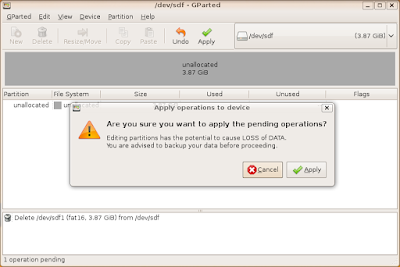
- Select the the USB drive, delete all partitions and click apply.
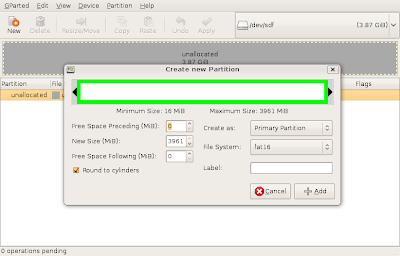
- Create a new FAT16 partition, apply
- Format FAT16 partition, apply

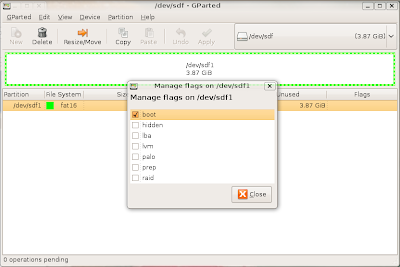
- Set boot flag, set label to DOS
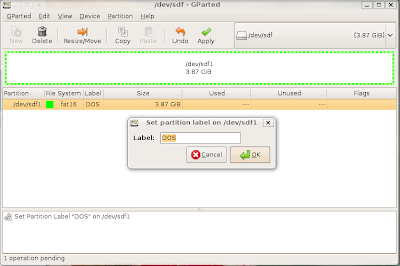
After all this is done, you should have a pen with a DOS partition. The drive I'm using is assigned to sdf1 partition.
sudo apt-get install dosemu
# some usb drives mount on the same drive as the cdrom, so we are changing it to be safe
sudo gedit /etc/dosemu/freedos/autoexec.bat
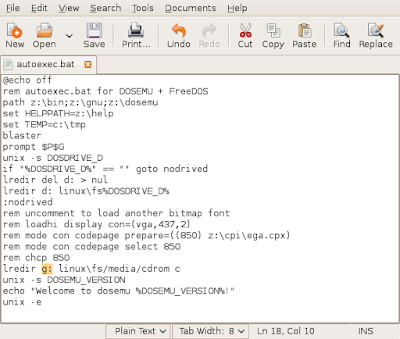
Create this file /home/youruser/dosemurc
Put the correct partition used in gparted section:
$_hdimage = "drives/* /dev/sdf1"
Save the file and execute
sudo dosemu -f /home/youruser/dosemurc
# as you can see the flash drive was assign to drive E under DOS
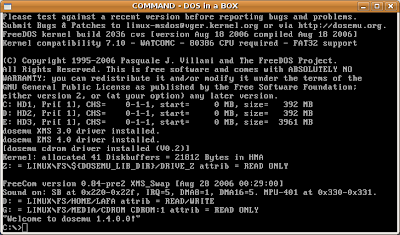
Type
> Z:
to change to the drive that contains the OS binaries and then type
> sys E:
to copy all needed files to make DOS boot.
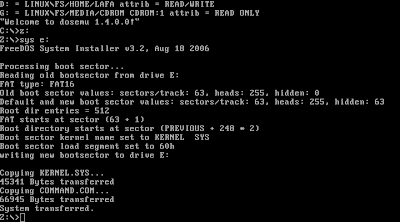
You can close dosemu, and remove the USB drive.
Plug it again to see a DOS drive on the desktop.
Now copy all the needed files to flash your bios.
NOTE: I'm not sure, but I think FAT16 should only work for USB drives with 4GB partitions or lower, so if you have a USB drive bigger than 4GB just create a partition with less than 4GB, and leave the rest as free space.


